
A "fill line" is a marking on drinkware indicating the volume of liquid held by the glass. Many countries mandate fill lines on glasses used commercially as a consumer protection measure.
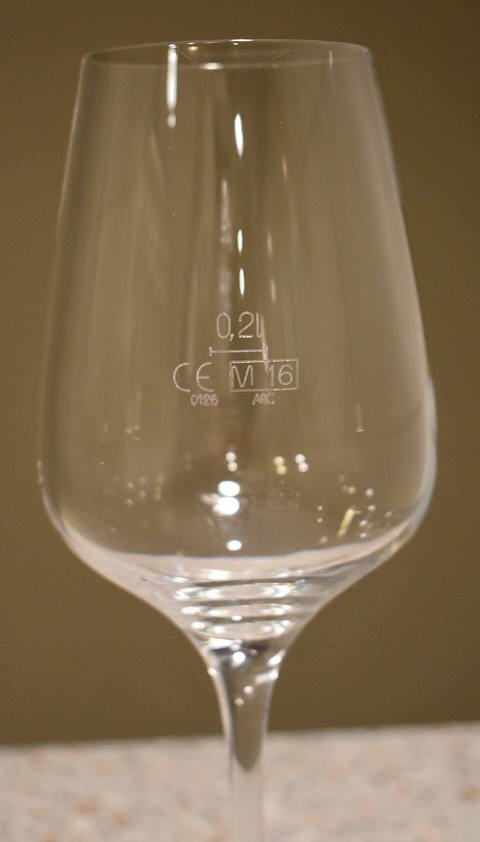
An example of a fill line on a wine glass
FastEditor supports customizing glassware with fill line indicators. For this, in the onboarding of the product, the JSON Schema needs to be extended with the fillLines property within the pages (print areas) object. The user can add one or more fill line definitions inside. For each fill file, the following properties need to be provided:
imageUrl: URL where the image for the fill line can be found.insertX: X coordinate in metric units where the fill line image should be inserted, relative to the top left corner of the print area.insertY: Y coordinate in metric units where the fill line image should be inserted, relative to the top left corner of the print area.insertWidth: Width in metric units of the inserted fill line image.insertHeight: Height in metric units of the inserted fill line image.
Therefore, by defining this, the decorator can offer the option to insert image hosted at https://your.domain/fill-line-image.png at a position of 20mm from the top and 30mm from the left of the maximum print area, at a size of 50x30mm. This would be defined in the following way:
"fillLines": [ { "imageUrl": "https://your.domain/fill-line-image.png", "insertX": 30, "insertY": 20, "insertWidth": 50, "insertHeight": 30 }]